


Introduction to Battery Terminal Corrosion
Ever opened a remote or gadget and found a crusty, white or greenish mess where the batteries sit? Yep, that’s battery corrosion and it’s more common than you think. The good news? You don’t need to be a tech wizard to fix it.
What Is Battery Corrosion?
Battery corrosion is the powdery buildup that forms around battery terminals when batteries leak or vent gases. It’s basically a chemical residue that forms when battery chemicals react with air and moisture. Think of it like rust for batteries annoying, messy, and totally capable of ruining your device if ignored.
Why Corroded Battery Terminals Are a Big Problem
Corrosion blocks the flow of electricity. That means weak performance, intermittent power, or a completely dead device. Left untreated, it can permanently damage the terminals, turning a perfectly good electronic into e-waste.
Understanding the Causes of Battery Corrosion
Knowing why corrosion happens makes it easier to prevent next time.
Chemical Reactions Inside Batteries
Most household batteries contain alkaline chemicals. Over time, especially when batteries are old or overused, they can leak potassium hydroxide. When that reacts with air, corrosion shows up like an uninvited guest.
Environmental Factors
Humidity and Moisture
Moist environments speed up corrosion. Bathrooms, kitchens, or damp basements? Not great places to store electronics.
Heat and Storage Conditions
Heat increases internal battery pressure, making leaks more likely. Leaving electronics in hot cars or near windows is basically asking for corrosion.
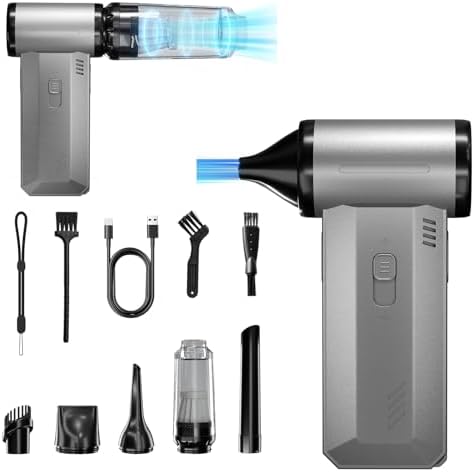
- Powerful Turbo Fan: Buyounger electric air duster reaches speeds of up to 150000 RPM, mini blower continuously adjustabl…
- 2-IN-1 Dust Blower: The handheld blower adopts a dual design of vacuuming and dusting, you don’t have to worry about stu…
- Versatile Cleaning Tool: Featuring 5 specialized nozzles, 3 brushes, a lanyard, and a storage pouch. The rechargeable ai…
Signs Your Battery Terminals Need Cleaning
Visual Indicators
- White, chalky powder
- Green or bluish residue
- Rust-like buildup on metal contacts
If it looks fuzzy or crusty, it’s time to clean.
Performance Issues in Electronics
- Device won’t turn on
- Power cuts in and out
- Buttons stop responding
If new batteries don’t fix it, corrosion is probably the culprit.
Safety First – Precautions Before Cleaning
Before you go all DIY mode, pause. Safety matters.
Powering Down the Device
Always turn off the device and remove batteries first. No shortcuts here.
Personal Safety Gear
Wear gloves if possible. Battery residue can irritate skin and eyes. Safety glasses are a smart move too.
Protecting the Electronic Components
Avoid letting liquid drip deeper into the device. Less is more when it comes to moisture.
Tools and Materials You’ll Need
Common Household Items
- Baking soda
- White vinegar or lemon juice
- Cotton swabs
- Old toothbrush
- Paper towels
Specialized Tools for Electronics
- Isopropyl alcohol (90%+)
- Small nylon or brass brush
- Compressed air
Step-by-Step Guide to Cleaning Corroded Battery Terminals
Let’s get hands-on.
Removing the Batteries Safely
Gently remove the batteries. If they’re stuck, wiggle don’t force. Dispose of leaked batteries immediately.
Neutralizing Battery Corrosion
Using Baking Soda Solution
Mix baking soda with a few drops of water to make a paste. This neutralizes alkaline corrosion like a charm.
Using Vinegar or Lemon Juice
For acidic corrosion, dip a cotton swab in vinegar or lemon juice and dab gently. You’ll see fizzing—that’s chemistry doing its thing.
Scrubbing the Terminals
Use a toothbrush or cotton swab to gently scrub away residue. Be patient. Corrosion didn’t form overnight, and it won’t disappear instantly either.
Drying and Reassembling
Wipe everything dry with a paper towel. Let it air-dry completely before inserting new batteries.

- DEEP CLEAN YOUR DEVICE – The keyboard cleaner can effectively deep clean all your electronic devices such as keyboards, …
- PROFESSIONAL KEYBOARD CLEANING BRUSH – A retractable moderate soft and hard brush works on computers, laptops and keyboa…
- KEYBOARD & SCREEN CLEANER TOOL – Use our wipe with the 2mm thicken and widen polishing cleaning cloth designed at a righ…
Cleaning Battery Terminals in Different Electronics
Remote Controls and Small Gadgets
These are the easiest. Just be careful not to flood the battery compartment.
Laptops and Portable Electronics
If the battery is removable, clean only the metal contacts. If not, don’t use liquids stick to alcohol and professional help if needed.
Toys, Flashlights, and Household Devices
Often heavily corroded but very forgiving. A thorough scrub usually brings them back to life.
What Not to Do When Cleaning Battery Terminals
Common Mistakes to Avoid
- Using metal tools aggressively
- Pouring liquid directly into the device
- Reusing old batteries
Materials That Can Damage Electronics
Avoid steel wool, knives, or excessive water. Think gentle, not destructive.
Preventing Battery Terminal Corrosion
An ounce of prevention beats an hour of scrubbing.
Proper Battery Storage
Remove batteries from devices you don’t use often. Store them in a cool, dry place.
Regular Maintenance Tips
Check battery compartments every few months. Early corrosion is way easier to clean.
Choosing the Right Batteries
High-quality batteries leak less. Rechargeables are also a solid option if compatible.
When to Replace Instead of Clean
Severe Corrosion Signs
If terminals are eaten away or broken, cleaning won’t help. Replacement is the smarter move.
Cost vs. Repair Considerations
If repair costs more than the device, it’s time to let go.
Environmental and Disposal Considerations
Safe Battery Disposal
Never throw batteries in regular trash. Use proper recycling points.
Eco-Friendly Cleaning Practices
Use minimal chemicals and reusable tools whenever possible.
Cleaning corroded battery terminals in electronics isn’t rocket science it’s more like basic home hygiene for your gadgets. With a few household items, some patience, and a little care, you can rescue devices that seemed totally dead. Even better? Regular maintenance and smart storage habits can stop corrosion before it starts. Treat your electronics well, and they’ll return the favor.
FAQs
How often should I check battery terminals for corrosion?
Every 3–6 months, especially for devices you don’t use regularly.
Can corrosion permanently damage electronics?
Yes, if left too long. Early cleaning prevents permanent damage.
Is battery corrosion dangerous to touch?
It can irritate skin. Gloves are recommended.
Can I use water alone to clean battery corrosion?
Not ideal. Water doesn’t neutralize corrosion and can cause damage.
Should I clean rechargeable battery terminals the same way?
Yes, but be extra gentle and avoid excess moisture.

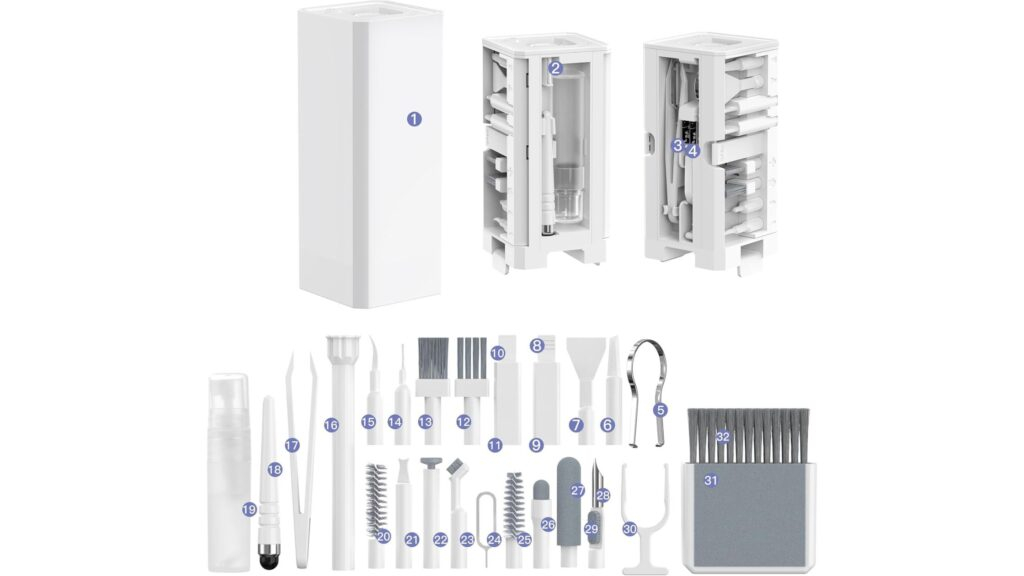
- Multi-Purpose Kit: This 32-in-1 electronics cleaning kit is designed for comprehensive cleaning of keyboards, headphones…
- Compact and Portable: The kit features a compact design, making it easy to carry and store for on-the-go cleaning needs
- Versatile Components: Includes a variety of tools(32) such as brushes, swabs, tweezers, and cleaning solutions to tackle…
RELATED POSTS
View all